Speech-to-text
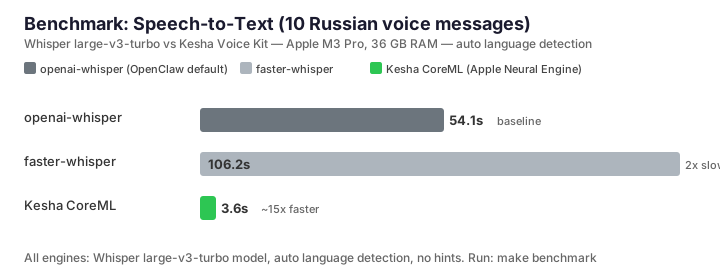
25 languages via NVIDIA Parakeet TDT. ~19× faster than Whisper on Apple Silicon,
~10× on an x86 CPU. Auto language detection, optional VAD for long audio,
word-level timestamps, plain text, or LLM-friendly TOON output.
- EN · RU · DE · FR · ES
- + 20 more
- word timestamps
- VAD opt-in
- JSON / TOON
Speaker diarization
Drop a meeting recording in, get back timestamped segments tagged with a stable
speaker ID. Powered by FluidAudio’s Sortformer model on the Apple Neural Engine,
running inside the engine process. kesha install --diarize installs
it with VAD and warms the compiled model, so the first --speakers
run skips the cold compile.
- --speakers
- darwin-arm64
- Sortformer (CoreML)
- opt-in install
New
MCP server
kesha mcp runs a local Model Context Protocol server over stdio with
four tools: transcribe_audio, synthesize_speech,
list_voices and list_languages. Add it to Claude Code
with claude mcp add kesha -- kesha mcp, or to Claude Desktop, Codex,
Gemini CLI or Cursor with one config entry. A missing engine or model fails the
tool with a kesha install hint; nothing downloads on its own.
- kesha mcp
- stdio
- Claude · Codex · Gemini · Cursor
New
First-run install offer
Run kesha audio.ogg before installing anything and, in a terminal,
Kesha shows the install plan, asks once, and on yes installs and transcribes in
the same run. Piped and non-interactive runs keep the error and its install
hint.
Text-to-speech
Kokoro runs through CoreML/ANE on Apple Silicon and ONNX on Linux and Windows;
Vosk-TTS covers Russian, and macOS system voices need no model download. macOS
auto-routes from the text language. On Linux and Windows mostly-Cyrillic text
still goes to ru-vosk-m02; other languages use --lang
or --voice. Kokoro (ANE or ONNX) and Vosk support SSML
<prosody rate> and <break>;
<emphasis> is Vosk-only. macOS system voices reject
--ssml.
OGG/Opus voice notes
Synthesize straight into a Telegram-ready voice note, ~24× smaller than WAV.
The default is 32 kbps; --bitrate takes 6000 to 510000 bits/s and
--sample-rate takes 8000, 12000, 16000, 24000 or 48000. The engine
handles the OggOpus container, no ffmpeg required.
- --format ogg-opus
- 32 kbps default
- --bitrate
Timestamped transcripts
--json --timestamps adds a words array to each segment,
with times counted from the start of the file. Each word's end is predicted on its
own, so neighbouring words can overlap.
Language detection
107 languages from audio via SpeechBrain ECAPA-TDNN. JSON and TOON also expose
textLanguage separately from spoken audioLanguage:
Apple’s recognizer on macOS and bundled tinyld elsewhere. Their confidence scales
are not comparable.
Voice activity detection
Silero VAD v5 trims silence on long, sparse recordings. Install it explicitly
with kesha install --vad; Kesha uses it automatically past 120
seconds once it is available.
Live dictation with recovery
On darwin-arm64, kesha record --live prints what you say to stdout.
With VAD installed, --auto-stop ends the recording after a second of
silence. Recording stops at 120 seconds unless you pass
--max-seconds. Ctrl-C still prints the transcript, and the audio is
kept as a WAV when Ctrl-C or SIGTERM ends the session or the transcript cannot be
delivered.
- darwin-arm64
- kesha install --vad
- --auto-stop
Privacy-safe diagnostic logs
Local-only command events with paths and user-supplied text redacted. The
default mode, retain-on-failure, writes a log only when a command
fails, so passing commands leave no file. kesha doctor surfaces
status; kesha logs manages them; kesha support-bundle
bundles them for support.
- kesha doctor
- kesha logs
- support-bundle
- local only
Multilingual TTS
Kokoro speaks English, Spanish, French, Italian and Portuguese; Vosk-TTS speaks
Russian. Chinese, Japanese and Hindi are darwin-arm64 only:
Chinese accepts Han text, and the Kokoro Hindi and Japanese voices take romanized
input. Devanagari or kana/kanji text goes to an installed macOS system voice
instead. Text in a script the voice cannot speak is refused with
E_SCRIPT_UNSUPPORTED and a hint naming the script to transliterate
into. On Linux and Windows, pass --lang.
- en · es · fr · it · pt
- ru (Vosk)
- hi · ja · zh (darwin-arm64)
- --lang off macOS
One home for every state file
Set KESHA_HOME and the model cache, diagnostic logs, the stats
database, and MCP audio all live under one directory with the same layout on
every platform: cache/, logs/,
stats.sqlite, mcp-audio/. A per-location variable such
as KESHA_CACHE_DIR still wins; unset, nothing changes and nothing is
migrated. kesha status --json and kesha doctor --json
report each path with its source. On darwin-arm64 some FluidAudio files still
stay outside KESHA_HOME.
- KESHA_HOME
- cache · logs · stats
- status --json paths
Structured errors and events
Every failure path prints a stable, machine-readable error [CODE]: …
line, and every engine progress, warning, or debug line on stderr is one NDJSON
event the CLI renders for you. kesha-engine describe publishes the
whole contract (flags, feature gates, the error taxonomy), and the CLI checks
each argv against it before spawning, so an unknown flag is refused with a
did-you-mean and exit 2. A run stopped by Ctrl-C or a signal reports
E_INTERRUPTED. Agents and CI can branch on why something
failed instead of regexing log soup.
- stable codes
- kesha-engine describe
- NDJSON events
- E_INTERRUPTED
New
kesha status --check
Readiness by exit code, for scripts. It exits 0 with no output when the engine
and the ASR model are installed. Otherwise it exits 1 with
E_MODEL_MISSING or E_ENGINE_SPAWN, or with
E_ENGINE_PROTOCOL when the engine does not answer within 15 seconds.
Plain status and status --json still exit 0.
Rust engine, zero deps
A single Rust binary for macOS arm64, Linux x64, and Windows x64. FluidAudio
(CoreML) runs in-process on Apple Silicon; two Swift sidecars cover macOS system
voices (say-avspeech) and text-language detection
(kesha-textlang); ort (ONNX) elsewhere. Kesha reads ogg, opus, mp3,
m4a, aac, wav, flac, aiff and webm. Encoding uses one statically linked libopus
and pure-Rust FLAC: royalty-free codecs, no patent exposure. Linux .deb and
.rpm packages signed with Sigstore.
No ffmpeg. No Python. No native Node addons.
OpenClaw-ready
Kesha ships as an OpenClaw plugin. Point OpenClaw's audio tool at
kesha and voice messages reach your agent as text, transcribed
locally with no API keys.